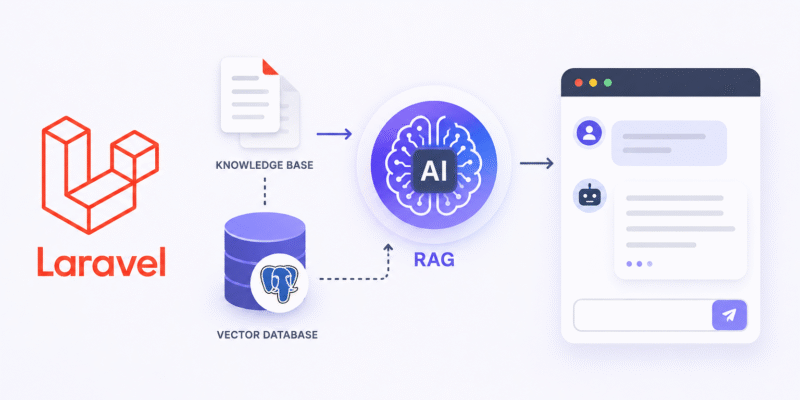
In this blog post we will build an Ai Assistant for KnowledgeBase using Laravel AI SDK and applying the Retrieval Augmented Generation (RAG) term in the search process.
Requirements
- Laravel 13 with React
- Laravel AI SDK
- Openai or similar AI service.
- Pgvector extension for storing embeddings
What is RAG?
RAG (Retrieval-Augmented Generation) is a technique that allows an AI model to answer questions using your own data instead of relying only on what it learned during training.
Think of it as giving the AI a search engine for your documentation.
Without RAG:
User → LLM → Answer from its training data
With RAG:
User
  ↓
Search knowledge base
  ↓
Retrieve relevant documents
  ↓
Provide documents to LLM
  ↓
LLM generates answer
Why do we need RAG?
LLMs have several limitations:
- They don’t know your private company data.
- They may hallucinate answers.
- Their training data becomes outdated.
- Fine-tuning for every documentation update is expensive.
RAG solves this.
Example:
Your company documentation says:
Refund requests can be made within 30 days.
Without RAG:
AI: Refunds are allowed within 14 days.
With RAG:
AI searches docs
↓
Finds "30 days"
↓
Answers correctly
High Level RAG FLOW
            Documents
      (PDF, FAQ, Articles)
                 ↓
          Text Extraction
                 ↓
            Chunking
                 ↓
        Generate Embeddings
                 ↓
          Store Vectors
                 ↓
────────────────────────────────

           User Question
                 ↓
        Generate Embedding
                 ↓
         Similarity Search
                 ↓
         Retrieve Chunks
                 ↓
       Send Context to LLM
                 ↓
            Final Answer
What are Embeddings?
Embeddings are numerical representations of text that capture meaning.
Instead of storing text like:
"How can I reset my password?"
We convert it something like:
[0.123, -0.451, 0.882, ...]
This list of floating-point numbers is called embedding.
When doing search query for term like “password reset steps” typically the LLM search using the embedding numbers to find the similar closest numbers which give us the similar matches.
Example:
Sentense:
password reset steps
Embedding:
[0.12, -0.44, 0.91, ...]
Sentense:
I forgot my password.
Embedding:
[0.13, -0.40, 0.89, ...]
These vectors end up being close to each other.
Embeddings are a core component in the RAG process.
What are Vectors?
A vector simply an array of numbers:
[0.12, -0.44, 0.91, ...]
Embeddings are vectors that represent the meaning of text.
How to find if two vectors similar to each other?
Using mathematical distance:
Example:
Refund policy
↓
[1.1, 2.2, 3.1]

How do I get my money back?
↓
[1.2, 2.3, 3.0]
Distance: small
Meaning: similar.
Now after this quick overview about RAG and embeddings, let’s prepare our sample project.
Installing pgvector
To store vector embeddings we need some kind of storage mechanism capable for storing embedding data. There are many cloud services to do that, such as Qdrant and Supabase and can also be hosted in your own server, as in our example we will host the embedding in Postgresql using the PgVector extension.
Install instructions for PgVector:
You must have Postgresql already installed.
sudo /usr/share/postgresql-common/pgdg/apt.postgresql.org.sh
sudo apt install postgresql-17-pgvector
Enable the pgvector extension
run the following query as the postgres user:
sudo -u postgres psql # run as postgres user
CREATE EXTENSION vector; # create the vector extension
Database Connections
Beside the default Mysql connection in the project, we will also use the pgsql connection to just store the embedding, so open the config/database.php and make sure you have this connection:
<?php

use Illuminate\Support\Str;
use Pdo\Mysql;

return [

    'default' => env('DB_CONNECTION', 'mysql'),

    ....

    'connections' => [

       ....
        'pgsql' => [
            'driver' => 'pgsql',
            'url' => env('PG_DB_URL'),
            'host' => env('PG_DB_HOST', '127.0.0.1'),
            'port' => env('PG_DB_PORT', '5432'),
            'database' => env('PG_DB_DATABASE', 'laravel'),
            'username' => env('PG_DB_USERNAME', 'root'),
            'password' => env('PG_DB_PASSWORD', ''),
            'charset' => env('PG_DB_CHARSET', 'utf8'),
            'prefix' => '',
            'prefix_indexes' => true,
            'search_path' => 'public',
            'sslmode' => env('PG_DB_SSLMODE', 'prefer'),
        ],

    ],
    ....

];
Add these environment variables to .env
PG_DB_HOST=localhost
PG_DB_PORT=5432
PG_DB_DATABASE=knowledgebase_lara_assistant
PG_DB_USERNAME=<Postgres DB user>
PG_DB_PASSWORD=<Postgres DB password>
You have to set your proper Postgres credentials.
Create Postgresql database, first login into postgresql cmd:
psql -h localhost -p 5432 -U postgres
You will prompted to enter the password. Once logged in use the CREATE DATABASE command:
CREATE DATABASE knowledgebase_lara_assistant;
You can verify the database created with the \l command.
Enable the Pgvector for the new database, enter this command:
\c knowledgebase_lara_assistant
CREATE EXTENSION vector;
Creating Migrations
For the migrations we will have a migration for Mysql tables and migration for Postgres table:
- Mysql migrations: responsible for storing knowledge-base data itself, can be raw data or uploaded documents.
- Postgres migrations: responsible for storing Ai vectors chunk in a vector based column.
Mysql Migrations
Let’s start with the Mysql migrations, for our example we will store the customer support knowledge-base as Categories and Items.
The embeddings can then be generated from the item content and stored in PostgreSQL.
php artisan make:model KnowledgeBaseCategory -m
php artisan make:model KnowledgeBaseItem -m
These command generate the Models and migration files for tables knowledge_base_categories and knowledge_base_items. Let’s open each migration and update like so:
Table knowledge_base_categories
Schema::create('knowledge_base_categories', function (Blueprint $table) {
    $table->id();
    $table->string('name');
    $table->text('description')->nullable();
    $table->boolean('is_active')->default(true);
    $table->timestamps();
});
Table knowledge_base_items
Schema::create('knowledge_base_items', function (Blueprint $table) {
           $table->id();
           $table->foreignId('knowledge_base_category_id')->constrained('knowledge_base_categories')->cascadeOnDelete();
           $table->string('title');
           $table->longText('content');
           $table->timestamps();
       });
Example data:
| id | name |
|---|---|
| 1 | Billing |
| 2 | Refunds |
| 3 | Accounts |
| 4 | API |
Example:
| title | category |
|---|---|
| How to request a refund | Refunds |
| Reset your password | Accounts |
| Upgrade your subscription | Billing |
Model app/Http/Models/KnowledgeBaseCategory.php
<?php

...

....
use Illuminate\Database\Eloquent\Relations\HasMany;

class KnowledgeBaseCategory extends Model
{
    protected $fillable = [
        'name',
        'description',
        'is_active',
    ];

    public function knowledgeBaseItems() : HasMany
    {
        return $this->hasMany(KnowledgeBaseItem::class, 'knowledge_base_category_id');
    }
}
Model app/Http/Models/KnowledgeBaseItem.php
<?php

...
...

use Illuminate\Database\Eloquent\Relations\BelongsTo;

class KnowledgeBaseItem extends Model
{
    protected $fillable = [
      'knowledge_base_category_id',
      'title',
      'content'
    ];

    public function category() : BelongsTo
    {
        return $this->belongsTo(KnowledgeBaseCategory::class, 'knowledge_base_category_id');
    }
}
Postgres Migrations
Create a new migration and model to store knowledge base chunks:
php artisan make:model KnowledgeBaseChunk -m
This creates the KnowledgeBaseChunk model and the migration file.
Open the migration to add the table structure:
<?php

...

return new class extends Migration
{
    protected $connection = 'pgsql';


    public function up(): void
    {
        Schema::create('knowledge_base_chunks', function (Blueprint $table) {
            $table->id();
            $table->unsignedBigInteger('knowledge_base_item_id');
            $table->integer('chunk_index');
            $table->text('chunk_content');
            $table->string('source');
            $table->vector('embedding', dimensions: 1536);
            $table->json('metadata')->nullable();
            $table->timestamps();
            $table->unique([
                'knowledge_base_item_id',
                'chunk_index'
            ]);
        });
    }


    public function down(): void
    {
        Schema::dropIfExists('knowledge_base_chunks');
    }
};
The $connection property is added with pgsql to tell laravel when migrating to use the pgsql connection.
For the table columns, a reference to knowledge_base_item_id is added, this refers to knowledge-base item id from the Mysql table knowledge_base_items.
The embeddings will be store in the column embedding of type vector and dimensions parameter:
$table->vector('embedding', dimensions: 1536);
And what the dimensions is, this for vectors size, which depends on the embedding model, For OpenAI’s text-embedding-3-small, dimensions are:
1536
For text-embedding-3-large:
3072
Open the model app/Models/KnowledgeBaseChunk.php
<?php

namespace App\Models;

use Illuminate\Database\Eloquent\Model;

class KnowledgeBaseChunk extends Model
{
    protected $connection = 'pgsql';

    protected $fillable = [
        'knowledge_base_item_id',
        'chunk_index',
        'chunk_content',
        'source',
        'embedding',
        'metadata',
    ];

    protected $casts = [
        'embedding' => 'array',
        'metadata' => 'array',
    ];
}
The $connection property added to indicate the target database this model will interact with and metadata and embedding casts to array.
Now run the migrate command:
php artisan migrate
If everything ok, the Mysql and Postgres tables will created.
Seeding sample data
In the project source, i added a json file in the public/seed-data/knowledge-base.json with sample data to populate the knowledge-base categories and items tables using seeder:
php artisan make:seeder KnowldegeBaseSeeder
KnowledgeBaseSeeder.php
<?php

namespace Database\Seeders;

use App\Models\KnowledgeBaseCategory;
use App\Models\KnowledgeBaseItem;
use Illuminate\Database\Seeder;
use Illuminate\Support\Facades\File;


class KnowledgeBaseSeeder extends Seeder
{
    /**
     * Run the database seeds.
     */
    public function run(): void
    {
        $path = public_path('/seed-data/knowledge-base.json');

        if (! File::exists($path)) {
            $this->command->error(
                "knowledge-base.json not found."
            );

            return;
        }

        $data = json_decode(
            File::get($path),
            true
        );

        foreach ($data['categories'] as $categoryData) {
            $category = KnowledgeBaseCategory::create([
                'name' => $categoryData['name'],
                'description' => $categoryData['description'] ?? null,
                'is_active' => true,
            ]);

            foreach ($categoryData['items'] as $itemData) {
                KnowledgeBaseItem::create([
                    'knowledge_base_category_id' => $category->id,
                    'title' => $itemData['title'],
                    'content' => $itemData['content'],
                ]);
            }
        }
    }
}
Next update the DatabaseSeeder.php
<?php

namespace Database\Seeders;
...
...
use Illuminate\Support\Facades\Hash;

class DatabaseSeeder extends Seeder
{
    ..
    ..
    public function run(): void
    {
        // Seed user
        User::factory()->create([
            'name' => 'Admin',
            'email' => 'admin@email.com',
            'password' => Hash::make('password'),
        ]);

        // Seed knowledge base
        $this->call(KnowledgeBaseSeeder::class);
    }
}
Run:
php artisan db:seed
Install the AI SDK
composer require laravel/ai
Publish the configuration files:
php artisan vendor:publish --provider="Laravel\Ai\AiServiceProvider"
Run the migrate command again to create the messages and conversation tables:
php artisan migrate
The config/ai.php contain the AI related config options, for example you can configure the default AI provider OpenAI, Anthropic, Openrouter, etc:
return [
    'default' => 'openai',

    'providers' => [
        'anthropic' => [
            'driver' => 'anthropic',
            'key' => env('ANTHROPIC_API_KEY'),
            'url' => env('ANTHROPIC_URL', 'https://api.anthropic.com/v1'),
        ],

     'openai' => [
            'driver' => 'openai',
            'key' => env('OPENAI_API_KEY'),
            'url' => env('OPENAI_URL', 'https://api.openai.com/v1'),
            'store' => env('OPENAI_STORE', true),
        ],

     'openrouter' => [
            'driver' => 'openrouter',
            'key' => env('OPENROUTER_API_KEY'),
        ],
];
If you want to use OpenAi for example, you have to add OpenAI related API key in .env:
OPENAI_API_KEY="<openi api key>"
Generate the Embedding
Create a console command to generate the vector embeddings from the existing knowledge data:
php artisan make:command GenerateKnowledgeBaseEmbeddings
Add this code in the GenerateKnowledgeBaseEmbeddings.php
<?php

namespace App\Console\Commands;

use App\Models\KnowledgeBaseCategory;
use App\Models\KnowledgeBaseChunk;
use App\Services\TextChunker;
use Illuminate\Console\Attributes\Description;
use Illuminate\Console\Attributes\Signature;
use Illuminate\Console\Command;
use Laravel\Ai\Embeddings;
use Laravel\Ai\Enums\Lab;

#[Signature('kb:embed {--refresh : Delete existing embeddings first}')]
#[Description('Generate embeddings for knowledge base articles')]
class GenerateKnowledgeBaseEmbeddings extends Command
{
    /**
     * Execute the command.
     */
    public function handle(TextChunker $chunker)
    {
        if ($this->option('refresh')) {

            $this->warn('Deleting existing embeddings...');

            KnowledgeBaseChunk::truncate();
        }

        $categories = KnowledgeBaseCategory::with('knowledgeBaseItems')->get();

        $this->info(
            "Found {$categories->count()} categories"
        );

        foreach ($categories as $category) {
            foreach ($category->knowledgeBaseItems as $item) {
                $this->line(
                    "Processing: {$item->title}"
                );

                $textForEmbedding = implode("\n\n", [
                    "Category: {$category->name}",
                    "Title: {$item->title}",
                    $item->content,
                ]);

                $chunks = $chunker->chunk($textForEmbedding, 100, 20);

                foreach ($chunks as $index => $chunk) {
                    $exists = KnowledgeBaseChunk::query()
                        ->where('knowledge_base_item_id', $item->id)
                        ->where('chunk_index', $index)
                        ->exists();

                    if ($exists) {
                        continue;
                    }

                    try {
                        $embedding = Embeddings::for([$chunk])
                            ->dimensions(1536)
                            ->cache()
                            ->generate(Lab::OpenAI, 'text-embedding-3-small')
                            ->embeddings[0];

                        // Store embeddings
                        KnowledgeBaseChunk::create([
                            'knowledge_base_item_id' => $item->id,
                            'chunk_index' => $index,
                            'chunk_content' => $chunk,
                            'embedding' => $embedding,
                            'source' => $category->name,
                            'metadata' => [
                                'category_id' => $category->id,
                                'category_name' => $category->name,
                                'category_description' => $category->description,
                            ]
                        ]);
                    } catch (\Throwable $ex) {
                        $this->error("Failed: {$ex->getMessage()}");
                    }
                }
            }
        }

        $this->info('Knowledge base embeddings generated.');

        return self::SUCCESS;
    }
}
And create this service app/Services/TextChunker.php
<?php

namespace App\Services;

class TextChunker
{
    public function chunk(string $text, int $chunkSize = 1000, int $overlap = 200): array
    {
        $chunks = [];

        $text = preg_replace('/\s+/', ' ', $text);

        $length = strlen($text);

        $offset = 0;

        while ($offset < $length) {
            $chunk = substr(
                $text,
                $offset,
                $chunkSize
            );

            $chunks[] = trim($chunk);

            $offset += ($chunkSize - $overlap);
        }

        return array_filter($chunks);
    }
}
The TextChunker::chunk() method, takes a particular text and give us an array of text chunks with specific length and overlap. This an essential mechanism when generating and storing vector embeddings.
For example if you have this text:
Category: Account Management

Title: How to create an account

To create an account, click Sign Up, enter your email address, choose a password, and verify your email
This text passed into the chunker and the result chunks as follows:
array:3 [
  0 => "Category: Account Management Title: How to create an account To create an account, click Sign Up, en"
  1 => "t, click Sign Up, enter your email address, choose a password, and verify your email."
  2 => "mail."
]
The $overlap parameter specifies length of text to appear in the start of each chunk based on the previous chunk, look the item index 1 ending with ‘email‘ and item index 2 starting with ‘email‘.
The above command GenerateKnowledgeBaseEmbeddings loops through the knowledgeBaseItems and prepares the text to be sent to the chunker:
$textForEmbedding = implode("\n\n", [
                    "Category: {$category->name}",
                    "Title: {$item->title}",
                    $item->content,
]);

$chunks = $chunker->chunk($textForEmbedding, 100, 20);
Next we loop through each chunk, then we check if this chunk already inserted or not, and if it inserted we skip it. Otherwise we generate the embedding using AI SDK Laravel/Ai/Embeddings facade:
$embedding = Embeddings::for([$chunk])
                            ->dimensions(1536)
                            ->cache()
                            ->generate(Lab::OpenAI, 'text-embedding-3-small')
                            ->embeddings[0];
If we noticed here the dimensions() method takes value ‘1536‘, this is the same value specified when generating the Postgres table vector column dimension and the OpenAi model ‘text-embedding-3-small‘.
As previously said you can use Other AI provider in condition that the embedding dimension length must match when Postgres vector column dimension and when calling the API.
The last thing after receiving the embeddings is to insert into Postgres knowledge_base_chunks table:
KnowledgeBaseChunk::create([
                            'knowledge_base_item_id' => $item->id,
                            'chunk_index' => $index,
                            'chunk_content' => $chunk,
                            'embedding' => $embedding,
                            ...
                            ...
                        ]);
Now you can launch this command:
php artisan kb:embed
It will loop through all items and generate embedding and insert it one by one.
You can run this command whenever you have added a new data to the knowledge base items, or for some production systems this code triggered from a Dashboard page when updating the knowledge-base.
Creating a new Agent
Create a new AI Agent:
php artisan make:agent CustomerSupportAgent
app/Ai/Agents/CustomerSupportAgent.php
<?php

namespace App\Ai\Agents;

use Laravel\Ai\Concerns\HasConversations;
use Laravel\Ai\Concerns\RemembersConversations;
use Laravel\Ai\Contracts\Agent;
use Laravel\Ai\Contracts\Conversational;
use Laravel\Ai\Contracts\HasTools;
use Laravel\Ai\Contracts\Tool;
use Laravel\Ai\Messages\Message;
use Laravel\Ai\Promptable;
use Stringable;

class CustomerSupportAgent implements Agent, Conversational, HasTools
{
    use Promptable, RemembersConversations, HasConversations;


    /**
     * Get the instructions that the agent should follow.
     */
    public function instructions(): Stringable|string
    {
        return <<<PROMPT
You are a customer support assistant.

Use ONLY the provided knowledge base context.

Rules:

- Answer using the supplied context.
- Be concise and accurate.
- If the answer is not present in the context, say:
  "I couldn't find that information in the knowledge base."
- Never invent policies, pricing, or procedures.
PROMPT;
    }

    /**
     * Get the list of messages comprising the conversation so far.
     *
     * @return Message[]
     */
    public function messages(): iterable
    {
        return [];
    }

    /**
     * Get the tools available to the agent.
     *
     * @return Tool[]
     */
    public function tools(): iterable
    {
        return [];
    }
}
RAG Service
Create app/Services/KnowledgeBaseRagService.php
<?php

namespace App\Services;

use App\Models\KnowledgeBaseChunk;
use Illuminate\Database\Eloquent\Collection;
use Laravel\Ai\Embeddings;
use Laravel\Ai\Enums\Lab;

class KnowledgeBaseRagService
{
    public function search(string $question) : Collection
    {
        $queryEmbedding = Embeddings::for([$question])
            ->dimensions(1536)
            ->generate(Lab::OpenAI, 'text-embedding-3-small')
            ->embeddings[0];

        return KnowledgeBaseChunk::query()
            ->whereVectorSimilarTo('embedding', $queryEmbedding, minSimilarity: 0.4)
            ->limit(10)
            ->get();
    }

    public function buildContext(Collection $chunks): string
    {
        return $chunks->map(function($chunk) {
            $category =
                $chunk->metadata['category_name']
                ?? 'General';

            $title =
                $chunk->metadata['title']
                ?? 'Untitled';

            return <<<TEXT
                [Category: {$category}]
                [Title: {$title}]

                {$chunk->chunk_content}
            TEXT;
        })->implode("\n\n---\n\n");
    }
}
The RAG service responsible for performing the vector search using search similarity. The search() method return the nearest vectors according to given query, which is done using laravel whereVectorSimilarTo() method:
KnowledgeBaseChunk::query()
              ->whereVectorSimilarTo('embedding', $queryEmbedding, minSimilarity: 0.4)
The method accepts the vector embedding, and internally do a cosine similarity to get nearest vectors, you can read more about it in Laravel AI docs.
The buildContext() method accepts the found chunks and construct a string to be appended to the system prompt later, and this what we call RAG.
Chat Controller
Create a new controller for chat:
php artisan make:controller ChatController
app/Http/Controllers/ChatController.php
<?php

namespace App\Http\Controllers;

use App\Ai\Agents\CustomerSupportAgent;
use App\Services\KnowledgeBaseRagService;
use Illuminate\Http\Request;
use Laravel\Ai\Enums\Lab;

class ChatController extends Controller
{
    public function __construct(private readonly KnowledgeBaseRagService $rag)
    {
    }

    public function index()
    {
        return inertia('chat/Index');
    }

    public function chat(Request $request)
    {
        $request->validate([
            'message' => ['required', 'string'],
        ]);

        $question = $request->string('message');

        $documents = $this->rag->search($question);

        $context = $this->rag->buildContext($documents);

        $prompt = <<<PROMPT
                Knowledge Base Context:

                {$context}

                Customer Question:

                {$question}
        PROMPT;

        return (new CustomerSupportAgent())
            ->stream(
                prompt: $prompt,
                provider: Lab::OpenAI,
                timeout: 600
            );

    }
}
The constructor injects the KnowledgeBaseRagService we just added above.
The index() method renders the inertia react page chat/Index.tsx.
The chat() method will be called from the frontend to trigger chat, first i validate the incoming message to be required.
Then we call the Rag service search() method to take the string message and return the corresponding embedding, these embedding given to the buildContext() to return a brand new context which then passed to the CustomerSupportAgent prompt param.
Next we call the stream() method on the agent to return a streamed response.
Add the chat routes in web.php
Route::get('/chat', [App\Http\Controllers\ChatController::class, 'index'])->name('chat.index');
Route::post('/chat', [App\Http\Controllers\ChatController::class, 'chat'])->name('chat.store');
Chat Page frontend
Install the frontend packages:
npm install @laravel/stream-react react-markdown
The @laravel/stream-react for displaying streamed response in frontend and react-markdown to display formatted html.
Create a new react page:
resources/js/pages/chat/Index.tsx
import { Head } from '@inertiajs/react';
import { useState, useEffect, useRef } from 'react';
import { useStream, useEventStream } from '@laravel/stream-react';
import ReactMarkdown from 'react-markdown';

type Message = {
    role: 'user' | 'assistant';
    content: string;
};

export default function Index() {
    const [message, setMessage] = useState('');
    const [messages, setMessages] = useState<Message[]>([]);
    const accumulatedRef = useRef('');
    const bottomRef = useRef<HTMLDivElement>(null);


    const stream = useStream('/chat', {
        onData: (data: string) => {
            const lines = data
                .split(/\n/)
                .map(line => line.replace(/^data:\s*/, '').trim())
                .filter(line => line && line !== '[DONE]');

            for (const line of lines) {
                try {
                    const parsed = JSON.parse(line);

                    if (parsed.type === 'text_delta' && parsed.delta) {
                        accumulatedRef.current += parsed.delta;

                        // Update the last assistant message live
                        setMessages(prev => {
                            const updated = [...prev];
                            const last = updated[updated.length - 1];

                            if (last?.role === 'assistant') {
                                updated[updated.length - 1] = {
                                    ...last,
                                    content: accumulatedRef.current,
                                };
                            }

                            return updated;
                        });
                    }
                } catch (e) {

                }
            }
        }
    });

    useEffect(() => {
        bottomRef.current?.scrollIntoView({
            behavior: 'smooth',
        });
    }, [messages]);

    const send = async () => {
        if (!message.trim() || stream.isStreaming) {
            return;
        }

        const question = message;
        accumulatedRef.current = '';

        setMessages(prev => [
            ...prev,
            {
                role: 'user',
                content: question,
            },
            {
                role: 'assistant',
                content: '',
            },
        ]);

        setMessage('');

        await stream.send({
            message: question,
        });
    };

    return (
        <div className="flex h-screen flex-col bg-white">
            <Head title="Customer support Assistant" />

            <header className="border-b px-6 py-4">
                <h1 className="text-xl font-semibold">
                    Customer Support Assistant
                </h1>
            </header>

            <div className="flex-1 overflow-y-auto p-6">
                <div className="mx-auto max-w-4xl space-y-6">
                    {messages.map((msg, index) => {
                        return (
                            <div
                                key={index} className={msg.role === 'user' ? 'flex justify-end' : 'flex justify-start'}
                            >
                                <div
                                    className={msg.role === 'user'
                                            ? 'max-w-3xl rounded-2xl bg-blue-600 px-4 py-3 text-white'
                                            : 'max-w-3xl rounded-2xl bg-gray-100 px-4 py-3 text-gray-900'
                                    }
                                >
                                    <div>
                                        <ReactMarkdown>
                                            {msg.content}
                                        </ReactMarkdown>
                                    </div>

                                    {msg.role === 'assistant'
                                        && index === messages.length - 1
                                        && stream.isStreaming && (
                                            <span className="animate-pulse">
                                                ▋
                                            </span>
                                        )}
                                </div>
                            </div>
                        )
                       }
                    )}
                </div>
            </div>

            <footer className="border-t p-4">
                <div className="mx-auto flex max-w-4xl gap-3">
                    <textarea value={message} onChange={(e) => setMessage(e.target.value)}
                        placeholder="Ask a support question..."
                        className="flex-1 resize-none rounded-xl border p-3"
                        rows={2}
                        onKeyDown={(e) => {
                            if (
                                e.key === 'Enter' &&
                                !e.shiftKey
                            ) {
                                e.preventDefault();
                                send();
                            }
                        }}
                    />

                    <button onClick={send} disabled={stream.isStreaming} className="rounded-xl bg-black px-5 py-3 text-white disabled:opacity-50"
                    >
                        Send
                    </button>
                </div>
            </footer>
        </div>
    );
}
Add a link to this page in js/components/app-sidebar.tsx in mainNavItems:
const mainNavItems: NavItem[] = [
    {
        title: 'Dashboard',
        href: dashboard(),
        icon: LayoutGrid,
    },
    {
        title: 'Chat',
        href: '/chat',
        icon: MessagesSquare,
    }
];
The chat page wraps a panel which have two areas, the messages area and a form to send the message. In the component i declared the messages and message state variables.
To work with streamed responses using the package @laravel/stream-react which provides a bunch of API’s to handle streaming responses, the one i used is the useStream() which accepts a post endpoint and return a stream object.
useStream accepts an options object which we used here, in this options there is onData() callback which is triggered whenever stream chunk is sent. To properly extract the data from the chunk first we split the lines as shown above:
const lines = data
                .split(/\n/)
                .map(line => line.replace(/^data:\s*/, '').trim())
                .filter(line => line && line !== '[DONE]');
Next we loop on each line, convert it into a valid json and check for parsed.type, the type we care about ‘text_delta‘:
if (parsed.type === 'text_delta' && parsed.delta) {
   //
}
Next we take each delta content and append it to the accumaltedRef.current ref variable. Finally we update the last message item in the messages array with the full accumaltedRef string.
The send() function triggered when we click the submit button and we check that there is no empty message and stream.isStreaming is false then it stops. Otherwise it appends the user message optimistically and send the request using stream.send().
In the component jsx we loop over the messages array and display each message on a reversed order depending on msg.role param:
<div  className={msg.role === 'user' ? 'max-w-3xl rounded-2xl bg-blue-600 px-4 py-3 text-white' : 'max-w-3xl rounded-2xl bg-gray-100 px-4 py-3 text-gray-900'
                                    }
                                >
Then wrap the msg.content using react-markdown:
<ReactMarkdown>
     {msg.content}
 </ReactMarkdown>
An animating pulse cursor displayed when stream.isStreaming is true:
{msg.role === 'assistant' && index === messages.length - 1
 && stream.isStreaming && ( <span className="animate-pulse">
        ▋
  </span>
)}
No you can try the app and go to the chat page, type anything from the knowledge base and you will the streamed response.