PHP 8 Attributes allow developers to attach structured metadata directly to classes, methods, properties, parameters, and more. They replace many older “DocBlock annotation” patterns and make frameworks like Laravel, Symfony, PHPUnit, and Doctrine cleaner and more powerful.
What Are PHP 8 Attributes?
Attributes are metadata declarations written using the #[…] syntax.
#[Route('/users')]
class UserController
{
}
This metadata can later be inspected using PHP Reflection and used to change application behavior dynamically.
PHP officially describes attributes as structured, machine-readable metadata that can be attached to declarations such as:
- Classes
- Methods
- Functions
- Properties
- Parameters
- Constants
- Closures
Why Attributes Matter
Before PHP 8, developers commonly used DocBlock annotations:
/**
 * @Route("/users")
 */
class UserController
{
}
This had several problems:
- Pure text parsing
- No syntax validation
- No autocomplete support
- Harder refactoring
Attributes solve these problems because they are:
- Native PHP syntax
- Fully parsed by PHP
- IDE-friendly
- Type-safe Reflection-friendly
Basic Attribute Syntax
Simple Attribute
#[Example]
class Demo
{
}
Attribute With Parameters
#[Route('/users', methods: ['GET'])]
class UserController
{
}
Multiple Attributes
#[Controller]
#[Middleware('auth')]
class DashboardController
{
}
Attributes Targets
When creating the attribute you can specify the target that this attribute will be applied on using some predefined constants:
Attribute::TARGET_CLASSAttribute::TARGET_FUNCTIONAttribute::TARGET_METHODAttribute::TARGET_PROPERTYAttribute::TARGET_CLASS_CONSTANTAttribute::TARGET_PARAMETERAttribute::TARGET_ALL
Built-in PHP Attributes
PHP ships with some native attributes. Examples include:
#[Override]
Ensures a method actually overrides a parent method.
class Base
{
    public function save() {}
}

class User extends Base
{
    #[Override]
    public function save() {}
}
#[Deprecated]
Marks code as deprecated:
#[Deprecated]
function oldFunction()
{
}
#[AllowDynamicProperties]
Used during migration away from dynamic properties To tell that this class use dynamic properties:
#[AllowDynamicProperties]
class LegacyClass
{
}
Creating Custom Attributes
Now to create custom attributes. A custom attribute is simply a class marked with the built-in Attribute attribute.
Step 1: Create the Attribute Class
<?php

namespace App\Attributes;

use Attribute;

#[Attribute]
class Route
{
    public function __construct(
        public string $uri,
        public string $method = 'GET'
    ) {}
}
As like any PHP class the attribute constructor can accept arguments, where you can pass later when using the custom attribute using the #[attribute] syntax.
Step 2: Use the attribute
#[Route('/users', 'GET')]
class UserController
{
}
As shown we applied the attribute using attribute name #[Route()] and passed the attribute arguments like we specified in the attribute constructor above.
Step 3: Read Attributes Using Reflection
At this point the Route attribute do nothing by itself, we must inspect them with PHP Reflection API to execute the attribute logic.
The Reflection Api currently supports some classes and methods to interact with attributes like ReflectionAttribute and getAttributes() method.
$reflection = new ReflectionClass(UserController::class);

$attributes = $reflection->getAttributes(Route::class);

$route = $attributes[0]->newInstance();

echo $route->uri;
echo $route->method;
Output:
/users
get
This is key idea behind frameworks using attributes.
Restricting Attributes Targets
You can limit where an attribute may be used by specifying the target:
#[Attribute(Attribute::TARGET_METHOD)]
class Route
{
}
The target can any of the predefined constants shown above. You can specify multiple targets using the bitwise operator:
#[Attribute(Attribute::TARGET_METHOD | Attribute::TARGET_CLASS)]
class Route
{
}
Now PHP will throw an error if someone uses it on a class.
Repeatable Attributes
You can specify the same attribute multiple times with different arguments as in the same of laravel middleware attribute:
#[Attribute(Attribute::IS_REPEATABLE)]
class Middleware
{
    public function __construct(
        public string $name
    ) {}
}
Usage:
#[Middleware('auth')]
#[Middleware('verified')]
class DashboardController
{
}
Real World Example: Validation Attribute
Create Validation Attribute
#[\Attribute(\Attribute::TARGET_PROPERTY)]
class Required
{

    public function validate(mixed $value): bool
    {
        return !empty($value);
    }

    public function message(string $field): string
    {
        return "$field is required";
    }
}
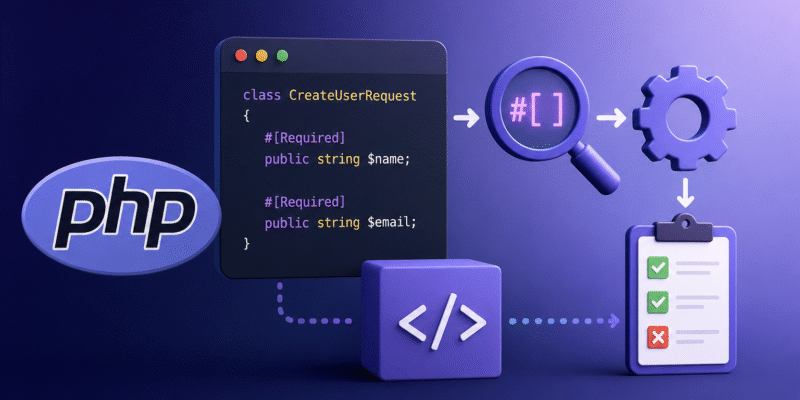
In this code we declared the Required attribute and specified the target to be Attribute::TARGET_PROPERTY because it will be used in a class property.
Next we added two methods that handle validation logic, the validate() accepts the property value and checks if this value is empty or not, and the message() method return the error message.
This is much like how frameworks like laravel handle validation attributes.
Apply It:
class CreateUserRequest
{
    #[Required]
    public string $name;

    #[Required]
    public string $email;
}
In the CreateUserRequest DTO i applied the #[Required] attribute to both the $name amd $email property. The attribute right now do nothing, so we need to add the necessary logic that will trigger validation.
Build Validator:
class Validator
{
    public function validate(object $object): array
    {
        $errors = [];

        $reflection = new ReflectionClass($object);

        foreach ($reflection->getProperties() as $property) {
        	foreach ($property->getAttributes() as $attribute) {
        		$instance = $attribute->newInstance();

        		if (method_exists($instance, 'validate')) {
        			$property->setAccessible(true);

        			$value = $property->getValue($object);

        			if (!$instance->validate($value)) {
        				$errors[] = $instance->message(
                            $property->getName()
                        );
        			}
        		}
        	}
        }

        return $errors;
    }
}
As you see the attribute logic handling done using PHP Reflection API. In the validate() method we query the class properties using $reflection->getProperties() and from each property we retrieve the list of attributes as we may have multiple attributes in the same property.
Next we create an instance of the attribute using $attribute->newInstance() method. Then we check if there a validate() method inside the attribute class with:
if (method_exists($instance, 'validate')) {
  ....
}
Then we invoke the validate() method on the attribute and if it’s not true then we append to the errors array.
Now to use it:
$request = new CreateUserRequest();
$request->name = '';
$request->email = '';

$validator = new Validator();

$errors = $validator->validate($request);

print_r($errors);
Writing attributes this way makes the attribute logic encapsulated in itself, later you can add other validator classes like min, max, etc.
Advanced Attribute Patterns
1. Dependency Injection
class ReportController
{
    public function __construct(
        #[Config('app.timezone')]
        protected string $timezone
    ) {}
}
This is used in Laravel to automatically inject configuration values.
2. ORM Mapping
Doctrine uses attributes heavily:
#[Entity]
class User
{
    #[Column(type: 'string')]
    private string $name;
}
3. Serialization
#[Hidden]
public string $password;
This is make property hidden from serialization.
Common Laravel Attributes (Laravel 11/12)
Modern Laravel increasingly uses attributes for container injection and routing-like behaviors.
#[Config]#[Cache]#[DB]#[Log]#[Storage]#[CurrentUser]
Example: #[Config]
use Illuminate\Container\Attributes\Config;

class PaymentService
{
    public function __construct(
        #[Config('services.stripe.secret')]
        protected string $secret
    ) {}
}
Laravel resolves the config values automatically.